A consent banner can look correct while tags run too early. The reverse is also possible: Google tags can load while their consent state is denied. A useful WordPress implementation treats those as separate questions.
Basic Consent Mode blocks Google tags until the visitor interacts with the banner; Google says no data, including the default consent state, is sent before that interaction. Advanced Consent Mode loads tags with defaults, often
denied; consent-aware or cookieless requests may still be visible before a choice. Neither model automatically blocks non-Google vendors such as a video embed or marketing pixel.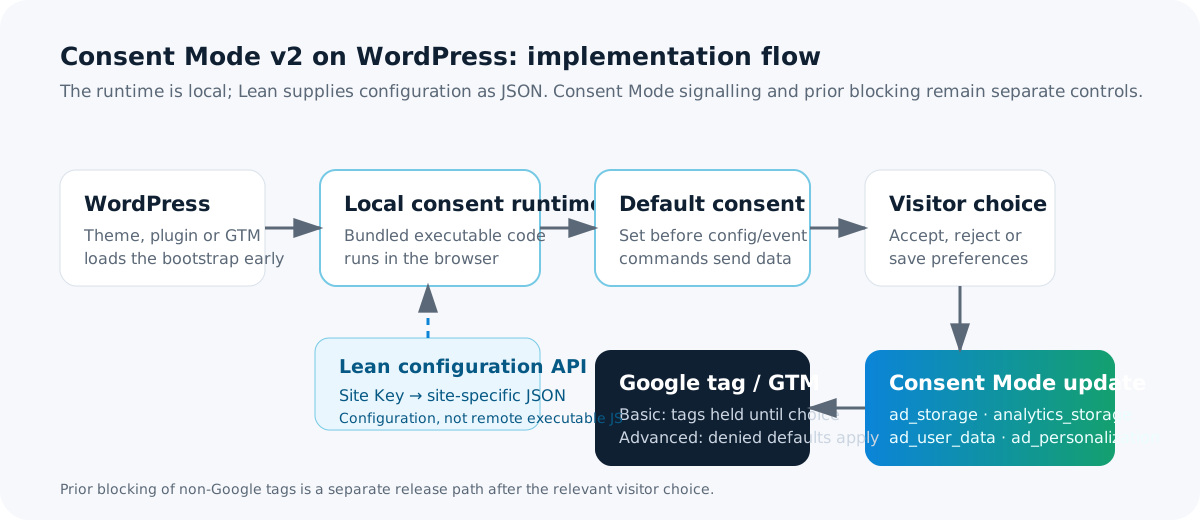
Set four defaults before measurement
Consent Mode v2 uses analytics_storage, ad_storage, ad_user_data, and ad_personalization. With direct gtag.js, define the data layer and default state before any config or event command:
<script>
window.dataLayer = window.dataLayer || [];
function gtag(){ dataLayer.push(arguments); }
gtag('consent', 'default', {
  analytics_storage: 'denied', ad_storage: 'denied',
  ad_user_data: 'denied', ad_personalization: 'denied'
});
</script>
<script async src="https://www.googletagmanager.com/gtag/js?id=G-XXXXXXXXXX"></script>
<script>gtag('js', new Date()); gtag('config', 'G-XXXXXXXXXX');</script>
Google requires this default before commands that send measurement data. A footer widget, page builder, cache plugin, or script-delay feature can make a technically correct snippet run too late. wait_for_update can bound an asynchronous CMP delay; it does not replace a default.
Propagate an explicit accept and an explicit reject
denied before interaction is only a default. When a visitor saves a choice, the consent integration should immediately send and persist the resulting state. This includes an explicit rejection.
gtag('consent', 'update', {
  analytics_storage: 'denied', ad_storage: 'denied',
  ad_user_data: 'denied', ad_personalization: 'denied'
});
Map the preference centre’s actual categories to the relevant signals. Do not grant all four values merely because analytics was accepted. On later page views, restore the saved choice through the same consent integration; Consent Mode does not store the banner decision for you.
Where Consent Mode should live in WordPress
Choose one owner for each signal. Multiple owners cause late defaults and conflicting updates.
- CMP plugin: if it documents Consent Mode support, it should own category mapping, saved choices, defaults, and updates.
- Google Tag Manager: GTM is a container, not a policy. A CMP template belongs on Consent Initialization – All Pages. Custom templates should use
setDefaultConsentStateandupdateConsentState. - Theme or custom plugin: when it emits
gtag.js, put the default in that same early header path, not in a footer hook. - Page builders: inspect final HTML. Their header/footer controls may be deferred, reordered, or absent from a template.
- Optimisation plugins: test after changing delay, defer, combine, CDN rewrite, or tag-manager optimisation settings.
Prior-block non-Google scripts separately
<script type="text/plain" data-consent-category="marketing"
  data-src="https://cdn.example.invalid/vendor.js"></script>
function releaseConsentScripts(category) {
  document.querySelectorAll(
    `script[type="text/plain"][data-consent-category="${category}"]`
  ).forEach((placeholder) => {
    const script = document.createElement('script');
    script.src = placeholder.dataset.src;
    script.async = true;
    placeholder.replaceWith(script);
  });
}
This is deliberately simplified. A production blocker must preserve relevant security and loading attributes, including nonce, integrity, crossorigin, referrerpolicy, async, defer, and required data-* configuration. It must also deal safely with modules, inline code, iframes, dynamic insertion, and duplicate release.
Prior blocking prevents future execution. It cannot reliably undo JavaScript already executed, erase a request already sent, or remove third-party state already created. When preferences change, send the relevant Consent Mode update and apply vendor-specific cleanup limits honestly.
Verify no-choice, reject, and accept
| Scenario | What to check |
|---|---|
| No choice | Use a clean profile and open DevTools Network before navigation. Basic: no Google transfer before interaction. Advanced: requests may exist with denied defaults. In Tag Assistant, inspect the earliest Consent event and all four signals. |
| Explicit reject | Save rejection, then verify a consent update carrying denied values. In Basic, Google tags stay blocked. In Advanced, denied-state behaviour may continue. Confirm prior-blocked vendors were not released. |
| Accept | Accept only relevant categories. Verify the latest Consent event reflects that selection and category-bound resources release only afterwards. |
Do not treat gcs or gcd alone as proof that all four v2 signals are correct. For regression testing, use a fresh Playwright context and CDP Network listeners before navigation; repeat the three scenarios and assert the contract for the selected model.
WordPress performance checklist
- Emit one minimal, deterministic consent bootstrap before measurement.
- Use one owner for Consent Mode.
- Audit page builders, caches, CDNs, and optimisation plugins after every configuration change.
- Do not duplicate GTM, Google tag, CMP loader, or release code.
- Measure empty-storage initial load separately from post-consent loading.
- Report request count and transfer separately from decoded resource size.
- Do not convert bytes into promised Core Web Vitals gains without a controlled test.
How the Lean WordPress connector approaches it
The official Lean Cookie Consent WordPress connector keeps its executable consent runtime bundled locally in the plugin. A site owner enters a Site Key; the browser runtime retrieves site-specific configuration as JSON from Lean and records consent choices through the consent API.
The connector does not expose arbitrary JavaScript insertion. Banner configuration, categories, services, language, and policy links are managed as configuration rather than a WordPress-side script field. This reduces the WordPress-side paths involved in banner configuration, but it cannot repair a separately injected GTM container, theme tag, page-builder snippet, or optimisation race. Test the deployed site.
Audit the implementation, not only the banner.
Use the checklist above, then install the official connector if it fits your WordPress workflow.
View the WordPress connectorReferences
- Google: Set up consent mode on websites
- Google: Consent mode overview
- Google: Troubleshoot consent mode with Tag Assistant
- Google: Tag Manager consent APIs
Last technically verified against Google primary documentation and the public Lean WordPress connector listing on 20 September 2026.